> For the complete documentation index, see [llms.txt](https://manual.selarti.com/llms.txt). Markdown versions of documentation pages are available by appending `.md` to page URLs; this page is available as [Markdown](https://manual.selarti.com/manual-en/main-sections-of-the-service/channels/kommo.-channel-connection.md).
# Kommo. Channel connection
*How to connect Kommo to Selarti as a communication channel.*
## What can Kommo do as a communication channel
* Automatically processes incoming requests and forwards them to a manager if necessary.
* Selects a specific funnel where the AI agent will be connected.
* Reminds the client about himself after a while and returns to active dialogue.
* Transfer conversations to the AI agent outside of business hours.
* The main feature is the hybrid system. Both a human and an AI agent can work in the same dialogue, within the familiar Kommo interface.
## Setting up the communication channel
Before starting the setup, log in to [Kommo](https://www.kommo.com/).
Open your personal account at [Selarti](https://selarti.com/panel?menu=dashboard), go to the «*Channels*» section, then click «*Add channel*» and select «*Kommo*» from the drop-down list.
Click «*Add Channel*».
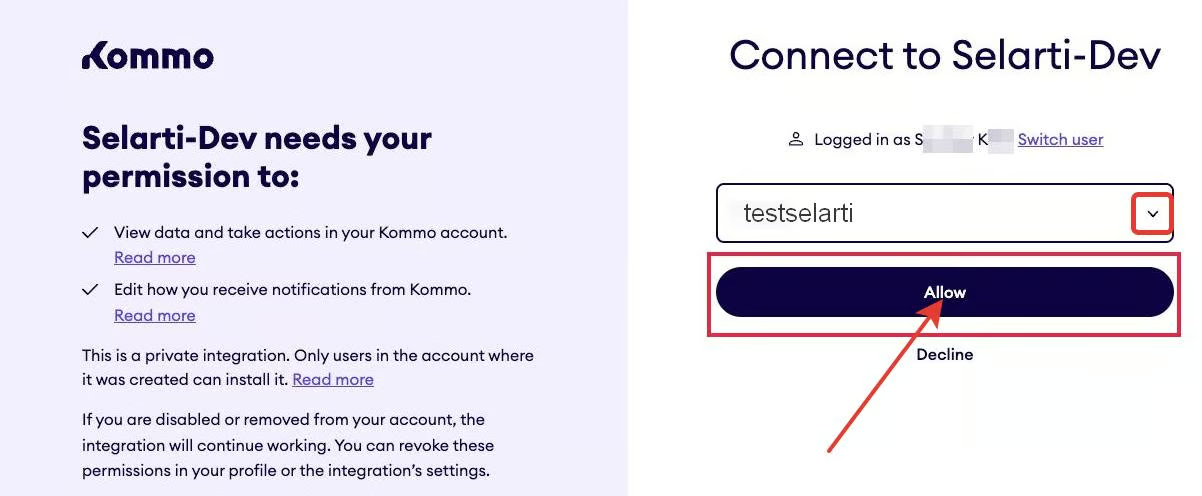
In the window that opens, select the desired Kommo account and click «*Allow*».
Then, in the Selarti personal account, in the «Channels» section, open the previously created «*Kommo*» channel and select the funnels where the AI agent should process the dialogues. Click «*Save*».
Done. To continue working, you need to create a task, which is described in the [article](/manual-en/main-sections-of-the-service/tasks.md).