> For the complete documentation index, see [llms.txt](https://manual.selarti.com/llms.txt). Markdown versions of documentation pages are available by appending `.md` to page URLs; this page is available as [Markdown](https://manual.selarti.com/manual-en/main-sections-of-the-service/choose-a-tariff.md).
# Choose a tariff
*The «Choose a tariff» section is intended for selecting, activating, and changing the company's pricing plan, as well as managing the message package and the billing period.*
## Overview
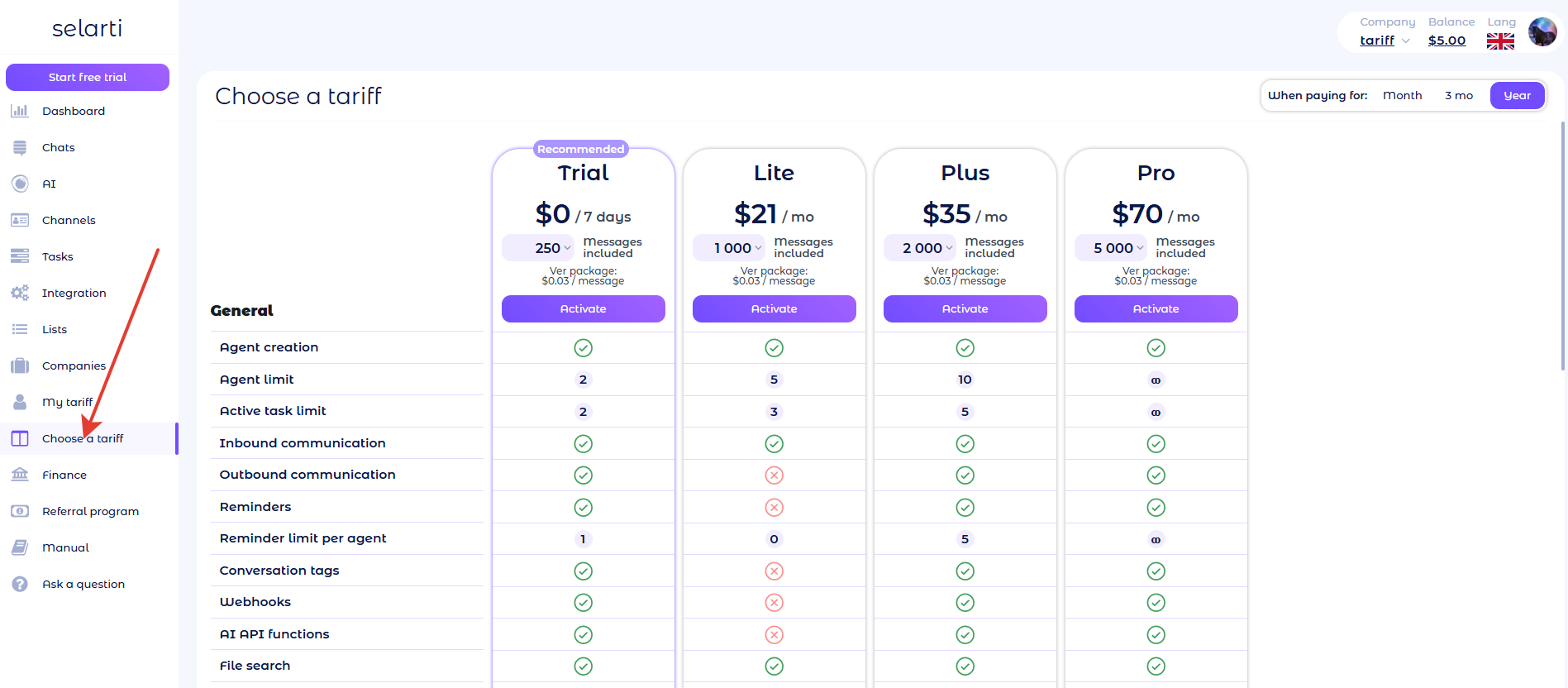
To go to the section, in the control panel click *«Choose a tariff»* ([.ru](https://selarti.ru/panel?menu=tariff) or [.com](https://selarti.com/panel?menu=tariff)).
The section consists of the following elements:
* The plans block, which includes plan cards with parameters and a list of available features and limits.
* Selection of the billing period.
### Plans
Available pricing plans are displayed in the center of the page.
Plans differ by feature set, limits, and message volume. More details in the article [«Plan and limit»](/manual-en/financial-matters/plans-and-limits.md).
{% hint style="info" %}
One plan is applied for all [companies](/manual-en/main-sections-of-the-service/companies.md) in the personal account.
{% endhint %}
Each plan card contains:
* The plan cost per month (exception — trial period).
* The number of messages in the package (package options are available).
* The cost of a single message in case of overuse.
* A button to manage the plan.
The button can have one of the following values:
* Activate — to activate the selected plan.
* Current plan — indicates the company's current active plan.
* Change — to change the parameters of the current plan.
{% hint style="warning" %}
When increasing the message package in the current plan or switching to a more expensive plan — an additional payment is calculated for the remaining days of the current period and changes are applied immediately.
When decreasing the message package in the current plan or switching to a cheaper plan — changes are applied on the next billing date. Until that moment, the current plan remains in effect.
{% endhint %}
### Message included
Each plan includes a message package. You can choose one of the available options.
The number of messages in the package depends on the selected plan.
The minimum package is included in the plan by default — it is not possible to activate a plan without a message package.
### Features included in the plans
Plans differ by set limits and available features, which are divided into several categories.
General:
* Agent creation — the ability to create AI entities (agents).
* Agent limit — the maximum number of AIs that can be created in the company.
* Active task limit— the number of tasks that can simultaneously be in the «in progress» status.
* Inbound communication — the ability to receive and handle incoming messages.
* Outbound communication — the ability to initiate communication with customers.
* Reminders — the presence of schedulers in the AI professional settings.
* Reminder limit per agent — the maximum number of schedulers that can be created for one AI.
* Conversation tags — dialog statuses configurable in the AI professional settings.
* Webhooks — the ability to use the «Integrations» section (except Telegram notifications, Daily report, Balance).
* AI API functions — use of the AI «custom api» function in the AI professional settings to integrate external services.
* File search — searching for information in knowledge base files.
* Web search — the ability to use the AI «Web search» function in the AI professional settings to search for information in open sources.
* Voice transcription — the ability to process voice messages (only in Telegram and WhatsApp).
* Blacklist and whitelist — lists for restricting or allowing AI interaction with users.
Admins and operators:
* Chat reading — the ability to view correspondence with customers.
* Interface responses — the ability to reply to customers on behalf of the bot in the «Chats» section.
* Transfer the conversation to an operator — the ability to hand over a dialog to an employee via the AI «operator» function in the AI professional settings.
* Admin limit — the maximum number of company administrators.
* Telegram notifications — balance and event notifications via the «Balance» and «Telegram notifications» integrations.
* Daily reports — sending daily reports to Telegram via the «Daily report» integration.
Channels and touchpoints:
* Connected channel limit — the maximum number of channels that can be added to the system (all added channels are counted regardless of their activity); available channels are listed below.
* Telegram bot — a Telegram bot for communicating with users.
* Telegram personal — a user's Telegram cloud account.
* Telegram for business — a Telegram account with the Telegram Business feature under a Premium subscription.
* VKontakte bot — a VKontakte bot for messaging via community messages.
* VKontakte personal — a VKontakte user account.
* WhatsApp — a WhatsApp account connected via a web session.
* WhatsApp business api — integration with the WhatsApp Business API (WABA).
* MAX — a messenger MAX user account.
* Avito — an Avito service profile.
* Instagram — an Instagram user account.
* amoCRM — connecting amoCRM as a communication channel.
* Kommo — connecting Kommo as a communication channel.
* Iframe — a communication channel for interacting with users on the website via an iframe chat form.
* Widget — a chat widget on the website that opens via a button on the page.
* Page messenger — a chat page at a URL link that can be used to communicate with customers.
### Billing period
In the top right corner of the section you can select the billing period.
The longer the billing period, the lower the monthly cost of the plan.
{% hint style="warning" %}
When changing the billing period, the plan cost is recalculated automatically, and changes are applied on the next billing date. Until that moment, the previously chosen period remains in effect.
{% endhint %}