> For the complete documentation index, see [llms.txt](https://manual.selarti.com/llms.txt). Markdown versions of documentation pages are available by appending `.md` to page URLs; this page is available as [Markdown](https://manual.selarti.com/manual-en/main-sections-of-the-service/companies.md).
# Companies
*Using the «Companies*» *section you can view the list of companies you have access to and add new companies.*
## General view of the section
In the Selarti personal account go to the section on the left «[*Companies*](https://selarti.com/panel?menu=companies)»*.*
## Viewing the list of companies
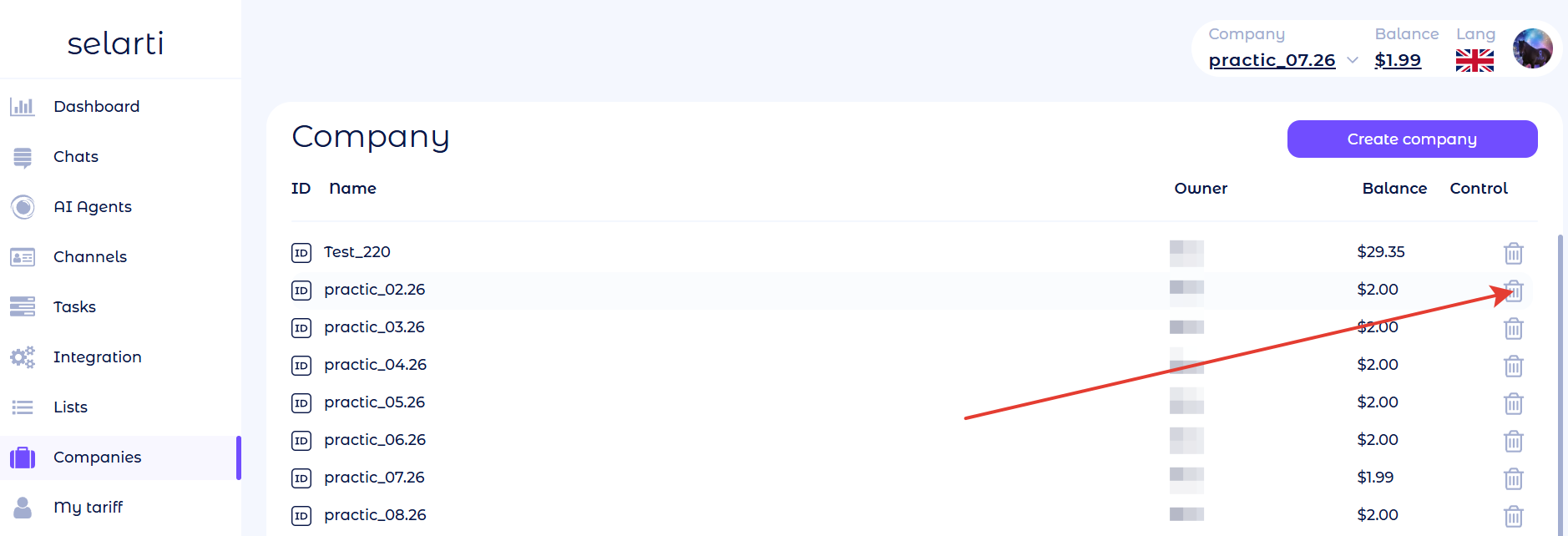
All companies you have access to are displayed on the left side of the screen. For each company the following are indicated:
* **ID** — the company's identification number; by clicking the symbol in this column you will copy the number to the clipboard;
* **Name** — the company's name;
* **Owner** — the owner's nickname in Telegram;
* **Balance** — the amount in the company's account in US dollars;
* **Сontrol** — you can leave someone else's company, and you can delete your own company.
## Adding users
You can add new users only to your own company.
To add users:
1. Click on the company to which you want to invite a user — a field will open *«Edit company»*;
2. Click the copy icon next to the label «*Invite admins*»;
3. Send the copied link to the person you want to add; after following the link they will join your company.
## Creating a company
To create a company go to the section «[*Companies*](https://selarti.com/panel?menu=companies)*»* and click «*Create company*»*.*
A company creation form will open — enter its name and click «*Create company*».
## Delete a Company
To delete an unnecessary company, go to the «[Companies](https://selarti.com/panel?menu=companies)» section and click the trash bin icon next to the required company.
If the company balance is zero, click *«Delete»* in the window that opens.
If the company balance is positive, select from the dropdown list on the right the company to which the funds will be transferred. Then click *«Delete»*.
If the company balance is negative, it cannot be deleted. Top up the account by the outstanding amount, then try deleting the company again.