> For the complete documentation index, see [llms.txt](https://manual.selarti.com/llms.txt). Markdown versions of documentation pages are available by appending `.md` to page URLs; this page is available as [Markdown](https://manual.selarti.com/manual-en/main-sections-of-the-service/referral-program.md).
# Referral program
*In the «Referral program»* *section you can create a referral link and track payments for the users you referred.*
## General view of the section
In the Selarti personal account, go to the section on the left «[*Referral program*](https://selarti.com/panel?menu=referral)».
## Main elements of the section
On the left, information is displayed under the heading *«Referral program»*:
* **Beneficiary** — your Telegram username;
* **Count users** — the number of users who registered using your referral link;
* **Subscription and package fee** — the percentage of commission you receive from payments made by each referral you brought in for their selected subscription plan and message package;
* **Overage fee** — the percentage of payments for messages used by referrals beyond their included package;
* **Service fee** — the percentage of payments made by referrals for additional services provided by our company, such as the Turnkey Setup service;
* **Your balance** — the current amount in the partner account that you can withdraw;
* **«Get payment»** button — used to withdraw your accrued funds. For more information about payouts, see the relevant [section below](#how-to-request-a-payout);
* **«Increase the commission to 50%»** button — used to contact the sales team and discuss individual commission rates for different types of services;
* A field for creating a referral code and link. For more information about creating a referral link, see the relevant [section below](#how-to-create-a-referral-link).
On the right side of the screen, under the *«Referral payments»* heading, you can find information about your referrals' payments and earned commissions:
* **Date** — the date when the referral made the payment;
* **referral use** — the Telegram username of the user who registered using your referral link;
* **Ref code** — the referral code used during registration;
* **Type** — the type of service for which the commission was earned;
* **Tariff** — the amount paid by the user;
* **Sum** — the amount of your commission;
* **Paid** — the payout status.
## How to Request a Payout
To request a payout, click *«Get payout»*.
Then select a payout method from the drop-down list:
* *To company balance in the service* — select one of the companies where you are an administrator to transfer the funds to its balance;
* *By bank details* — submit a payout request through technical support.
## How to create a referral link
{% hint style="info" %}
The referral link is tied to the account/user, not to the company.
{% endhint %}
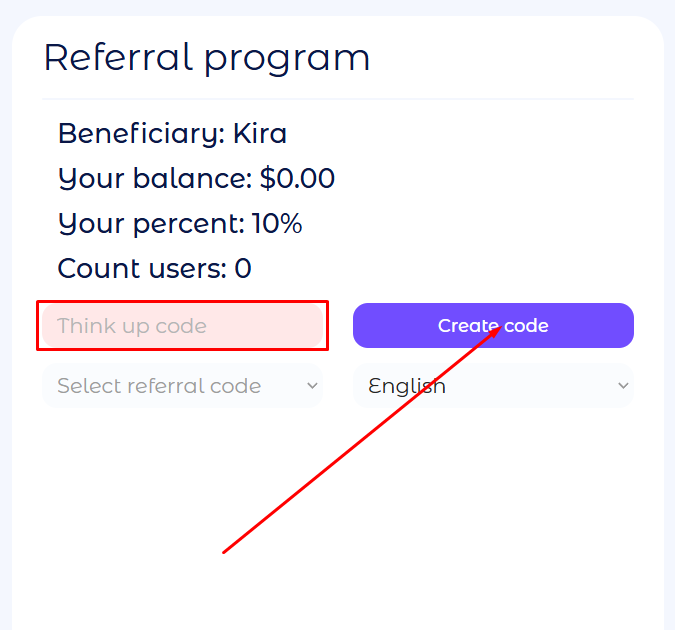
To create a referral link, come up with a referral code and enter it in the *«Think up code»* field, then click *«Create code»*.
Select the created code from the drop-down list, then choose a language. You can select the English, Uzbek, or Russian version of the website for your referrals.
Once created, the following links will be available:
* *Landing link* — leads to the Selarti homepage;
* *SignUp link* — takes users directly to the service registration page;
* *Link to the bot* — opens a chat with the Telegram bot, where users can learn about the service, access their account, or contact support;
* *Promocode* — a field containing a promo code that can be copied and shared with a customer. If the customer registers without using a direct referral link, they can enter the promo code in a dedicated field when they first log in to associate their account with the partner.
Choose the option that works best for you and share it wherever you want to attract referrals.

.png?alt=media&token=a85e6500-d644-4117-832b-d259f199c3c3)